Build a Restaurant Menu QR Code System with Claude Code
Remember when every restaurant suddenly needed a QR code menu? Some paid hundreds for clunky subscription services. Others just uploaded a PDF. Today I'll show you how to build something way better - a beautiful, interactive digital menu that generates its own QR code. And it'll cost you nothing.
Why Build Your Own Menu?
Most QR menu services charge $30-100/month for something you can build in 15 minutes. And their templates all look the same - generic, forgettable, definitely not matching your restaurant's vibe.
With your own menu, you get:
- Complete design control - Match your restaurant's brand perfectly
- No monthly fees - Host it free or for pennies
- Instant updates - Change prices or items anytime
- Works offline - Customers can browse even with spotty WiFi
- No app downloads - Just scan and view in the browser
What We're Building
Our menu system includes:
Mobile-First Design
Looks perfect on phones since that's how people scan QR codes
Dietary Tags
Vegetarian, gluten-free, spicy indicators for each dish
Category Navigation
Quick filters for starters, mains, desserts, drinks
Auto QR Code
Generates a QR code pointing to your live menu URL
Let's Build It
Step 1: Set Up Your Project
Create a new folder and open Claude Code:
$ mkdir restaurant-menu
$ cd restaurant-menu
$ claude
Step 2: Describe Your Menu
Here's the prompt I used. Feel free to customize it with your restaurant's name, style, and actual menu items:
Build me a restaurant menu website for "The Golden Fork" (fine dining).

Features needed:
1. Elegant header with restaurant name and tagline
2. Category navigation: Starters, Mains, Desserts, Drinks
3. Menu items with: name, description, price, dietary tags
4. Dietary tags: V (vegetarian), GF (gluten-free), spicy icon, popular star
5. QR code section at the bottom that generates a QR code for the current URL
6. Footer with address, hours, phone number
7. An "Add Item" button that opens a modal to add new menu items
8. Store menu items in localStorage so they persist
9. Mobile-responsive design
10. Use a gold/black/cream color scheme for elegance

Include some sample menu items to start with. Use the qrcode.js library
from CDN for QR code generation.

Make it a single HTML file so it's easy to deploy.
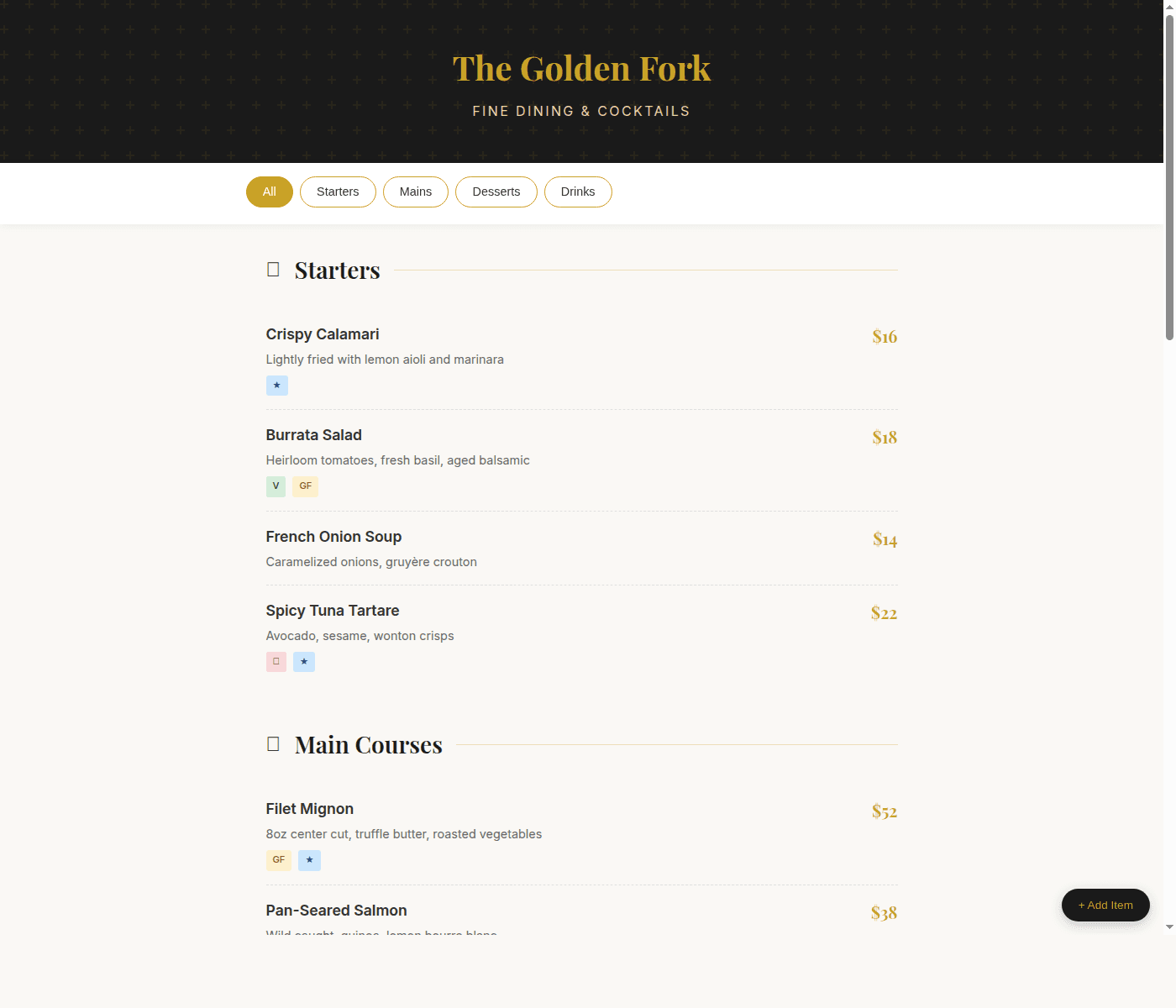
Claude will create a complete menu system. Here's what the output looks like:
Building your restaurant menu...
Creating index.html
I've created a complete restaurant menu with:
- Elegant gold/black design
- 15 sample menu items across 4 categories
- Dietary tags (V, GF, spicy, popular)
- Category filtering navigation
- QR code generator using qrcode.js
- Admin panel to add new items
- localStorage persistence
Open index.html to preview, or deploy to make it live!
Step 3: Preview Locally
Open the file in your browser to see how it looks:
$ open index.html
# Or on Linux:
$ xdg-open index.html
You should see a beautiful menu. Try clicking the category buttons to filter, and check out the QR code section at the bottom.
Step 4: Customize Your Menu
Before deploying, you'll want to add your actual menu items. You can either:
- Use the built-in admin: Click "+ Add Item" to add dishes through the UI
- Edit the code: Ask Claude to update the sample data with your real menu
To replace the sample menu with your own:
Replace the sample menu with these items:

STARTERS:
- Soup of the Day - Daily rotating selection - $8
- Caesar Salad - Romaine, parmesan, croutons, house dressing - $12 (V, GF option)
- Wings - 8 crispy wings, choice of sauce - $14 (popular, spicy)

MAINS:
- Burger - 8oz beef, brioche bun, fries - $18 (popular)
- Fish & Chips - Beer-battered cod, mushy peas - $22
- Veggie Bowl - Quinoa, roasted vegetables, tahini - $16 (V, GF)

...and so on
Step 5: Deploy to DartUp
Once you're happy with your menu, deploy it:
Deploy this to DartUp as "golden-fork-menu"Deploying to DartUp...
Zipping project files...
Uploading to dartup.dev...
✓ Deployment successful!
Your menu is live at: https://golden-fork-menu-x1y2.dartup.dev
Print Your QR Code
Now that your menu is live, the QR code at the bottom of the page will automatically point to the real URL. You can:
- Screenshot the QR code from your deployed site
- Print it on table tents, menus, or window stickers
- Add it to your Google Business profile
Pro tip: Table tents
Print your QR code on small table tents with text like "Scan for Menu." Customers love not having to wait for a server to bring the menu, and you save on printing costs when prices change.
Customization Ideas
Want to take it further? Ask Claude to add:
- "Add photos for each menu item"
- "Add a specials section that I can update easily"
- "Add allergen information with expandable details"
- "Support multiple languages - English and Spanish"
- "Add a 'call to order' button for takeout"
- "Connect to a simple CMS so my staff can update items"
Real-World Uses
This same approach works for:
Bars & Breweries
Rotating tap lists, cocktail menus
Coffee Shops
Espresso drinks, pastry case
Food Trucks
Quick menus for the line
Events & Catering
Wedding menus, event programs
Updating Your Menu
When you need to change prices or add seasonal items:
- Open Claude Code in your menu folder
- Tell Claude what to change: "Update the burger price to $20"
- Say "deploy this again"
Your existing URL stays the same, so all your printed QR codes keep working. Customers just see the updated menu.
Wrapping Up
You just built a professional digital menu system that would cost $50+/month from a SaaS provider. It's customized to your brand, you control it completely, and it's live on a real URL ready for customers to scan.
The whole process - from empty folder to live menu - takes about 15 minutes. And if you ever want to change anything, it's just a conversation with Claude.
Go make something delicious. 🍽️
Ready to build your menu?
Sign up for DartUp and deploy your first menu for free.
More tutorials
- Getting Started with DartUp - Complete guide to your first deployment
- Build a Real Estate CRM - Interactive maps and deal tracking